How to Reserve NFTs for Your Treasury Using TradePort’s No-Code Drops Launchpad

Reserving NFTs for your treasury is a key step for many projects. Whether you're planning community giveaways, rewarding KOLs, transferring 1:1 art pieces, or securing assets for future use, TradePort makes it simple.
Here’s a quick 5-step guide to reserving your NFTs:
1. Add a Reservation Field
In this step, you will note which NFTs you would like to reserve from the entire set.
If you're using JSON, include a "reserveForCreator" field. For CSV files, add a "Reserve For Creator" column.
Mark "TRUE" for each NFT you want to reserve.


2. Upload and Review
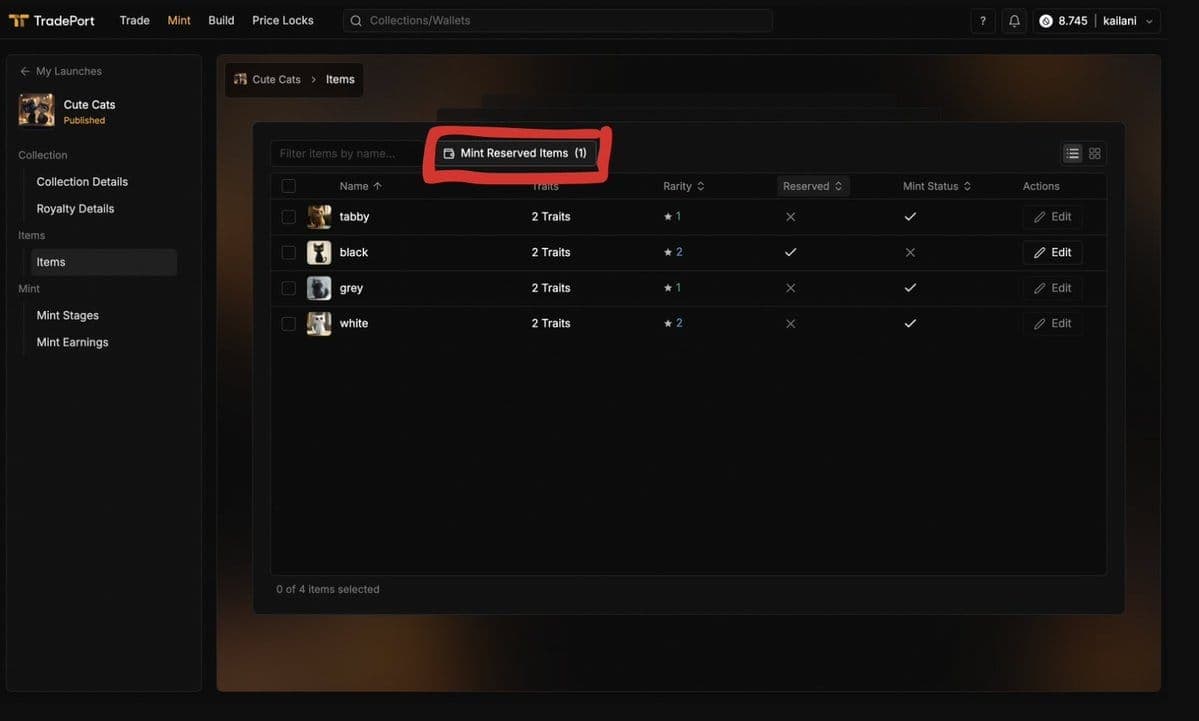
Start uploading your collection to the TradePort no-code launchpad. Once your metadata and images are uploaded, reserved NFTs will display a checkmark in the "Reserved" column.
Review and make any necessary edits before proceeding. If there are additional NFTs that you would like to add to the treasury, you can click on the NFT to edit the field.

3. Publish Your Collection
Complete the launchpad flow and finish uploading your collection on TradePort! At this point, you will receive your official mint link.

4. Mint Your Reserved NFTs
After your NFT collection is published, it will appear under the "My Launches" Tab. Once you are in the minting portal, navigate to the "Items" page.
Click on "Mint Reserved Items."

5. Transfer to Your Treasury Wallet
A modal will pop up asking for your treasury wallet address. Complete the transaction to mint your NFTs securely.

You're all set — it's that simple!
Here are a few helpful tips to keep in mind:
Treasury NFTs can be minted at any time after your collection is published and your mint link is live. You can mint them before, during, or after the public mint — whatever works best for your team.
No service fees apply to NFTs minted directly to your designated treasury wallet.
Once you've minted your reserved NFTs to your treasury wallet, you won’t be able to add more to that allocation. If you need to mint additional NFTs, we recommend creating a new mint stage, then adding your treasury wallet to the allowlist as the sole minter.
As always, if you have questions while minting your NFTs, feel free to reach out.
Get started on your next drop today at TradePort.xyz.